TABLE OF CONTENT
ToggleIn today’s fast-paced digital marketplace, everyday communication carries significant weight for your brand. Every outbound email sent by your leadership, sales team, or support desk serves as a direct touchpoint with clients, partners, and prospects. Learning how to create a professional email signature for your business is no longer just a design exercise—it is a core strategy for building trust, maintaining brand consistency, and driving direct conversions.
As email clients evolve, dark mode adoption expands, and privacy regulations tighten, traditional static footers with basic text are no longer sufficient. Today’s digital ecosystem demands responsive, interactive, and centrally managed email footers that function like micro-landing pages.
This comprehensive guide covers everything you need to know about designing, deploying, and managing a professional email signature for your business in 2026, featuring modern best practices, compliance standards, and cloud-based management tools.
Before diving into layout grids and HTML code, it is essential to understand why learning how to create a professional email signature for your business is critical for modern operations.
┌─────────────────────────────────────────────────────────────────────────┐
│              THE BUSINESS IMPACT OF AN EMAIL SIGNATURE                 │
└─────────────────────────────────────────────────────────────────────────┘
                                     │
            ┌────────────────────────┼────────────────────────┐
            ▼                        ▼                        ▼
  ┌───────────────────┐    ┌───────────────────┐    ┌───────────────────┐
  │  Brand Identity   │    │ Trust & Integrity │    │ Lead Generation   │
  │ Consistent visual │    │ Verified details, │    │ Clickable CTAs,   │
  │ logo, fonts, &    │    │ disclaimers, &    │    │ dynamic banners,  │
  │ corporate colors  │    │ security badges   │    │ & booking links   │
  └───────────────────┘    └───────────────────┘    └───────────────────┘
When employees send emails with mismatched fonts, outdated logos, or random phone number formats, it weakens your corporate image. Establishing a unified professional email signature for your business ensures that every outgoing message aligns with your official brand guidelines, reinforcing your visual identity across thousands of monthly interactions.
Modern email signatures do more than just share contact details—they act as active marketing channels. By adding interactive elements like promotional banners, meeting schedulers, or short video demos, a professional email signature for your business converts routine email exchanges into steady traffic for your sales pipeline.
In an era of increasing email spoofing and phishing attacks, a well-structured signature provides essential verification. Including official registered details, confidentiality notices, and data privacy links reassures recipients while satisfying legal and regulatory requirements.
A common mistake when designing an email footer is trying to pack in too much information. The key to establishing a professional email signature for your business lies in maintaining clarity, balance, and visual structure.
+-------------------------------------------------------------------------------------------------------+
|                    STRUCTURAL ANATOMY OF A MODERN EMAIL SIGNATURE                                     |
+--------------------------+-----------------------------------+----------------------------------------+
| Signature Layer          | Recommended Content               | Key Design Objective                   |
+--------------------------+-----------------------------------+----------------------------------------+
| Primary Identity         | Full Name, Job Title, Department  | Establish clear authority & identity   |
| Corporate Details        | Company Name, Brand Logo, Address | Reinforce corporate brand equity       |
| Direct Contact           | Work Phone, Direct Extension, URL | Offer quick communication channels     |
| Interactive Elements     | CTA Banner, Calendar Booking Link | Drive measurable user engagement       |
| Compliance & Legal       | Confidentiality Notice, Unsubscribe| Ensure legal and regulatory compliance |
+--------------------------+-----------------------------------+----------------------------------------+
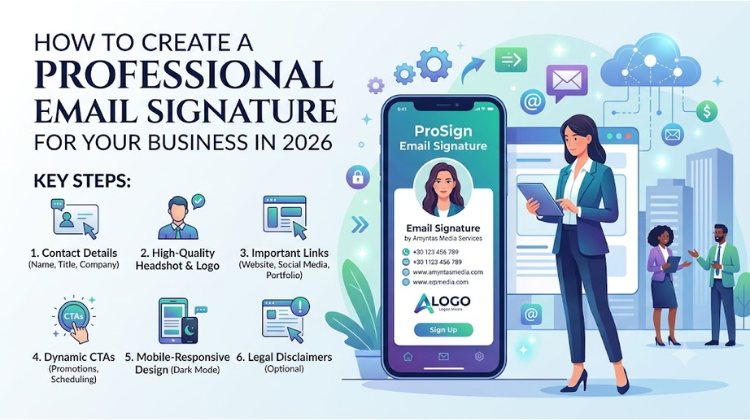
Full Name and Professional Title: State the sender’s full identity and exact organizational role clearly.
Company Name and High-Resolution Logo: Display a clear, crisp corporate logo sized appropriately for web rendering.
Direct Contact Numbers: Provide verified phone numbers with international country codes (+1, +91, etc.) for easy dialing.
Website and Landing Page URLs: Link directly to your homepage or specific, campaign-focused landing pages.
Curated Social Media Icons: Limit social links to 2–4 primary, active corporate profiles (e.g., LinkedIn, X, YouTube) rather than linking every platform.
Actionable Call-to-Action (CTA): Incorporate a subtle button or custom banner promoting webinars, product launches, or appointment scheduling.
Legal Disclaimers: Add mandatory confidentiality, tax, or privacy disclaimers tailored to your industry.
Design trends prioritize clean layouts, fast load times, accessibility, and dark mode compatibility.
                     DARK MODE & RESPONSIVE COMPATIBILITY

      +-------------------+     +-------------------+     +-------------------+
      | Mobile-First HTML |     | Dark Mode Visuals |     | Safe Web Fonts    |
      | Scalable tables & |     | Transparent PNGs  |     | Arial, Helvetica, |
      | fluid layouts     |     | & adaptive colors |     | or Trebuchet MS   |
      +---------+---------+     +---------+---------+     +---------+---------+
                |                         |                         |
                +-------------------------+-------------------------+
                                          |
                                          v
                              +-----------------------+
                              | Cross-Client Render   |
                              | Gmail, Outlook, Apple |
                              +-----------------------+
More than 60% of business emails are opened on mobile devices. If your email footer breaks on small screens, forces horizontal scrolling, or collapses into micro-text, it creates friction. A mobile-friendly professional email signature for your business uses single-column responsive HTML tables that adjust seamlessly across desktop monitors, tablets, and smartphones.
Dark mode is widely used across operating systems and email clients. Email signatures designed without dark mode in mind often display unreadable black text on dark gray backgrounds, or blocky white rectangles around logos.
Use transparent PNGs for logos and icons.
Add subtle outer strokes around dark elements so they remain visible on dark backgrounds.
Test rendered colors in both light and dark themes across Gmail, Outlook, Apple Mail, and mobile environments.
Stick to web-safe system fonts such as Arial, Helvetica, Trebuchet MS, or Verdana to ensure your signature renders correctly on devices without custom fonts installed. Keep your color scheme focused—use no more than two or three colors derived directly from your brand guidelines. Use contrasting tones to make names and titles stand out without creating visual clutter.
Creating an enterprise-ready email signature requires structured planning and testing. Follow this step-by-step workflow to design and deploy signatures across your team.
┌─────────────────────────────────────────────────────────────────────────┐
│               SIGNATURE DEVELOPMENT & DEPLOYMENT PIPELINE               │
└─────────────────────────────────────────────────────────────────────────┘
                                     │
                                     ▼
  ┌─────────────────────────────────────────────────────────────────────┐
  │ Step 1: Content Scoping & Data Mapping                              │
  │ Gather required employee details, official job titles, direct links,│
  │ and corporate brand assets.                                         │
  └─────────────────────────────────────────────────────────────────────┘
                                     │
                                     ▼
  ┌─────────────────────────────────────────────────────────────────────┐
  │ Step 2: HTML/CSS Code Construction                                  │
  │ Build clean, table-based HTML using inline CSS styling. Avoid       │
  │ JavaScript, external stylesheets, or heavy graphics.                │
  └─────────────────────────────────────────────────────────────────────┘
                                     │
                                     ▼
  ┌─────────────────────────────────────────────────────────────────────┐
  │ Step 3: Multi-Client Compatibility Testing                        │
  │ Test rendering across Microsoft Outlook, Gmail, Apple Mail, iOS,    │
  │ Android, and dark mode viewports.                                   │
  └─────────────────────────────────────────────────────────────────────┘
                                     │
                                     ▼
  ┌─────────────────────────────────────────────────────────────────────┐
  │ Step 4: Centralized Deployment & Cloud Governance                   │
  │ Deploy signatures centrally using automated cloud tools like         │
  │ ProSign Email to manage domain-wide formatting automatically.       │
  └─────────────────────────────────────────────────────────────────────┘
Identify the essential data fields required for each department. While sales representatives might need dynamic meeting booking links, customer support staff may prioritize direct portal links or helpline numbers instead.
Avoid relying on heavy image-only signatures. Image-heavy signatures often trigger spam filters, get blocked by privacy tools, fail to render in dark mode, and prevent recipients from highlighting and copying text. Instead, construct an HTML signature using clean nested tables and inline CSS formatting.
Never embed images as raw email attachments, as this increases overall email size and clutters recipient downloads. Store company logos, social media icons, and campaign banners on secure, high-speed Content Delivery Networks (CDNs) using HTTPS image paths.
Before rolling out a signature company-wide, test how it displays across popular email clients (Outlook, Gmail, Apple Mail, Yahoo), web browsers, and mobile operating systems (iOS, Android).
Even experienced marketing and IT teams run into issues when setting up email signatures. Avoid these common design and configuration mistakes:
+-------------------------------------------------------------------------------------------------------+
|                       COMMON SIGNATURE ERRORS & PRACTICAL SOLUTIONS                                  |
+--------------------------+-----------------------------------+----------------------------------------+
| Critical Flaw            | Technical Impact                  | Recommended Solution                   |
+--------------------------+-----------------------------------+----------------------------------------+
| Image-Only Signatures    | Blocked by email clients, non-     | Use HTML tables with clickable text &  |
|                          | clickable text, triggers spam     | cloud-hosted image assets              |
| Excessive Information    | Creates clutter, slows reader     | Limit content to essential details &   |
|                          | comprehension, looks unprofessional| 2–4 targeted links                     |
| Mismatched Employee Signatures | Weakens brand consistency &     | Deploy signatures centrally using      |
|                          | risks non-compliant messaging     | cloud management tools                 |
| Broken Mobile Rendering  | Distorts layouts on small screens, | Use responsive HTML tables and inline  |
|                          | requiring horizontal scrolling    | CSS optimized for mobile viewports     |
+--------------------------+-----------------------------------+----------------------------------------+
Exporting a full signature design as a single image file (JPEG or PNG) causes several operational problems:
Recipients cannot copy text like phone numbers or addresses.
Many email apps block external images by default, leaving a blank box instead of your contact details.
Single-image signatures do not scale cleanly across different screen sizes, hurting readability on mobile devices.
Including long quotes, redundant secondary email addresses, multiple personal phone numbers, or endless social media links creates visual noise. Keep your signature clean, uncluttered, and focused on essential business contact details.
Asking employees to copy, paste, and configure their own HTML signatures leads to formatting errors, wrong contact information, outdated logos, and broken brand consistency. Managing signatures centrally eliminates these discrepancies across your entire organization.
Managing individual signatures manually across growing teams quickly becomes impractical. ProSign Email by Amyntas Media Services simplifies this by giving businesses centralized control over their corporate email signatures.
                     PROSIGN EMAIL ARCHITECTURE

                      +---------------------------+
                      | Central Admin Dashboard   |
                      | Design templates & rules  |
                      +-------------+-------------+
                                    |
          +-------------------------+-------------------------+
          |                         |                         |
          v                         v                         v
  +---------------+         +---------------+         +---------------+
  | Google        |         | Microsoft 365 |         | Custom SMTP   |
  | Workspace     |         | Integration   |         | Gateways      |
  +-------+-------+         +-------+-------+         +-------+-------+
          |                         |                         |
          +-------------------------+-------------------------+
                                    |
                                    v
                        +───────────────────────+
                        | Automatic Uniform     |
                        | Signature Injection   |
                        +───────────────────────+
Centralized Dashboard Control: Design, edit, and update email signatures for every team member from a single dashboard. Updates apply automatically domain-wide without requiring user action.
Dynamic Directory Integration: Connect directly with Google Workspace or Microsoft 365 directory data. User details like names, titles, phone numbers, and departments populate automatically into standardized templates.
Targeted Department Banners: Create customized marketing banners for different teams—such as linking sales signatures to calendar bookings and support signatures to customer satisfaction surveys.
Cross-Client and Mobile Support: ProSign Email ensures your signatures render cleanly across all major email clients, web apps, and mobile operating systems.
Full Legal Compliance: Add managed disclaimers, privacy notices, and legal footers automatically across all outbound corporate emails to maintain regulatory compliance.
A professional email signature for your business should be viewed as an active marketing assets. Reviewing performance metrics helps optimize engagement over time.
┌─────────────────────────────────────────────────────────────────────────┐
│               SIGNATURE PERFORMANCE ANALYTICS ENGINE                    │
└─────────────────────────────────────────────────────────────────────────┘
                                     │
                                     ▼
  ┌─────────────────────────────────────────────────────────────────────┐
  │ Step 1: Attach UTM Parameter Tracking                               │
  │ Append UTM codes to links and banners (e.g., `?utm_source=email`).  │
  └─────────────────────────────────────────────────────────────────────┘
                                     │
                                     ▼
  ┌─────────────────────────────────────────────────────────────────────┐
  │ Step 2: Track Click-Through Performance                            │
  │ Measure user engagement across booking links, promo banners, and    │
  │ social media icons using web analytics.                             │
  └─────────────────────────────────────────────────────────────────────┘
                                     │
                                     ▼
  ┌─────────────────────────────────────────────────────────────────────┐
  │ Step 3: Run A/B Banner Tests                                        │
  │ Test different promotional copy, button styles, and banner layouts │
  │ to improve conversion rates.                                        │
  └─────────────────────────────────────────────────────────────────────┘
By tagging links in your signature with UTM parameters, your web analytics team can track exact click-through rates, website visits, and lead conversions generated directly by outbound employee emails. Refresh promotional banners regularly to keep messaging current for ongoing product updates, seasonal campaigns, and upcoming events.
#Email Signature Design #Business Email Signature #Corporate Email Footer #Pro Sign Email #Amyntas Media Services #HTML Signature Template #Email Signature Generator #Dark Mode Email Signature #Mobile Responsive Signature #Centralized Signature Management #Email Marketing Banner #Google Workspace Signature #Outlook Email Signature #Brand Consistency #Email Footer Design #Enterprise Email Signature #Legal Email Disclaimer #Gurgaon IT Services #B2B Email Marketing #Email Deliverability #Email Branding #Signature Automation #Client Communication #Email CTA #Professional Branding #Email Security #Email Footer Template #Dynamic Email Signature #Clickable Email Signature #GST Compliant Invoicing #Cloud Productivity Tools
Answer: To create a professional email signature for your business that works reliably across all devices, build your layout using responsive HTML tables with inline CSS rather than relying on complex divs or single image files. Keep table widths under 600 pixels, use standard web-safe fonts like Arial or Helvetica, and host image assets on secure HTTPS servers. Avoid large file attachments and ensure logo backgrounds are transparent to support both light and dark display modes. To ensure consistency across mobile clients like iOS Mail and Gmail, manage your email footers centrally using a cloud solution like ProSign Email by Amyntas Media Services.
Answer: An HTML-based professional email signature for your business is superior to an image-only file because it ensures readability, accessibility, and deliverability. Image-only signatures are often blocked by default email security settings, trigger spam filters, fail to scale properly on mobile screens, and prevent recipients from selecting or copying text like phone numbers and web addresses. In contrast, HTML signatures combine live, searchable text with optimized graphics, preserving clickable links and ensuring your contact details remain visible even when images are disabled.
Answer: Amyntas Media Services, based in Sector-31, Gurugram (Gurgaon), simplifies email signature management through its cloud-based ProSign Email platform. Instead of relying on individual employees to configure signatures manually, Amyntas offers centralized control, allowing IT and marketing teams to deploy, edit, and enforce uniform signatures across all user accounts automatically. Their platform integrates with platforms like Google Workspace, offers transparent INR B2B tax invoicing, and provides local technical support to ensure full brand compliance across your company.
Answer: A balanced professional email signature for your business should combine core identity details with compliance and marketing features:
Core Identity: Full name, job title, company name, corporate logo, direct phone number, and official website URL.
Marketing Touchpoints: Clickable CTA buttons, appointment scheduling links, and strategic promo banners.
Compliance Controls: Mandatory legal disclaimers, confidentiality notices, and privacy policy links.
Using centralized software like ProSign Email allows you to update these components automatically across departments while maintaining visual consistency.
Answer: Businesses in Gurgaon and across India choose Amyntas Media Services because they combine cloud technology expertise with direct local service and support. Based in Gurugram, Amyntas provides simple, affordable business tools—including ProSign Email—backed by dedicated support and fully compliant 18% GST B2B invoicing in Indian Rupees. Partnering with Amyntas eliminates foreign transaction fees, simplifies local billing, and provides access to cloud implementation specialists who help streamline email workflows, productivity tools, and corporate security setups.
 5 Reasons to Buy a Zoho Workplace License Through an Authorized Partner
  Google Workspace to Zoho Workplace Migration: Why You Should Buy Licenses Through a Partner
  How to Buy a Zoho Workplace License Through a Partner in India (And Save Up to 20%)
  What is the Easiest SaaS Tool to Send Personalized Bulk Emails Directly from Gmail in 2026?
  No More Mailchimp: The Easiest SaaS Tool to Send Personalized Bulk Emails directly from Gmail


© 2026 All Rights Reserved | Designed by Amyntas Media Works