Finding efficient ways to scale personalized outreach, handle client communications, distribute invoices, and streamline cold sales campaigns is essential for growing businesses. Small and Medium-sized Businesses (SMBs) often struggle to balance high email deliverability with cost efficiency. Traditional email marketing platforms can be overly complex and expensive, while simple bulk email dispatches from standard inboxes frequently land in spam folders.
This challenge has led to the popularity of native Gmail mail merge tools. By connecting Google Sheets and Google Docs directly to Gmail, SMBs can run automated campaigns from their existing Google Workspace environment. However, choosing the right tool requires careful evaluation.
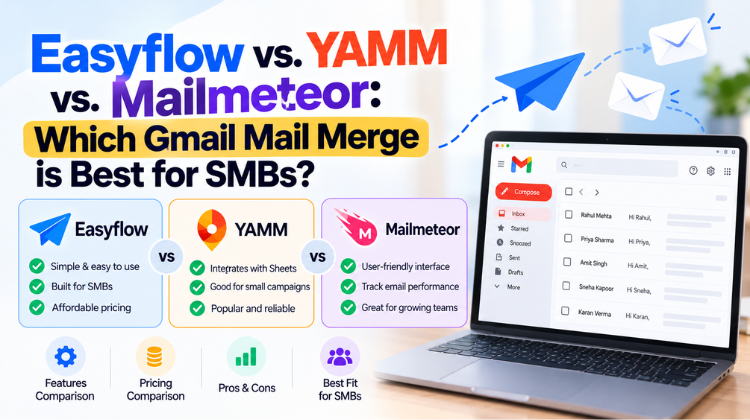
This guide provides an in-depth comparison of Easyflow Mail Merge, Yet Another Mail Merge (YAMM), and Mailmeteor to determine which Gmail mail merge is best for SMBs in 2026.
Why SMBs Need a Native Gmail Mail Merge Tool
A native Gmail mail merge tool acts as a bridge between spreadsheet data (Google Sheets) and email composition templates (Gmail or Google Docs). Using dynamic placeholder tags such as {{First Name}}, {{Company}}, {{Invoice Total}}, or {{Account Status}}, these applications populate recipient-specific data into outbound messages automatically.
Key Operational Advantages for SMBs
Primary Inbox Placement: Messages originate directly from your business’s Google Workspace account rather than shared third-party SMTP servers, increasing domain trust.
Simplified Workflows: Teams can manage outreach campaigns, status logs, and recipient lists inside Google Sheets without learning separate CRM platforms.
Flexible Personalization: Modern mail merge engines go beyond basic text tags to support dynamic attachments, unique PDF generation, and custom sending logic.
Enhanced Data Privacy: Native Google Workspace add-ons process data within your Google infrastructure, reducing security risks.
Core Criteria to Evaluate Which Gmail Mail Merge is Best for SMBs
To determine which Gmail mail merge is best for SMBs, software must be evaluated across five operational categories:
Google Workspace Integration: How seamlessly the tool runs across Google Sheets, Google Docs, and Gmail.
Deliverability & Spam Protection: Built-in safeguards such as intelligent email throttling, natural sending delays, and domain security compatibility.
Dynamic PDF & Attachment Handling: The ability to auto-generate personalized documents (invoices, proposals, certificates) and attach unique files automatically.
User Interface & Tracking Analytics: Real-time logging of email sends, opens, clicks, replies, and bounces directly in spreadsheet columns.
Cost Efficiency & ROI: Affordable pricing structures designed for growing teams without restrictive per-contact limits.
Deep-Dive Tool Reviews: Easyflow vs. YAMM vs. Mailmeteor
1. Easyflow Mail Merge (by Amyntas Media Services)
Key Strengths of Easyflow:
Multi-Format Document Generation: Automatically generates customized proposals, invoices, contracts, and certificates in PDF, DOCX, or Google Docs format from Google Sheet data.
Dynamic Attachment Engine: Converts Google Docs templates into individual PDF attachments on the fly for each recipient.
Intelligent Deliverability Throttling: Uses human-like sending intervals to comply with Google sending limits and prevent spam flags.
Native Real-Time Tracking: Logs detailed statuses (Sent, Opened, Replied, Bounced) directly within your Google Sheet columns.
Strict Privacy Security: Executes operations entirely within your Google Workspace environment without storing confidential files or contact records on external servers.
Best SMB Use-Case:
Easyflow is an ideal choice for SMBs that require both email marketing and document creation—such as sales teams sending custom proposals, HR departments issuing onboarding documents, or finance teams distributing invoices.
2. Yet Another Mail Merge (YAMM)
Yet Another Mail Merge (YAMM) is a long-standing mail merge add-on for Google Sheets. It focuses primarily on simple, one-click email merges for straightforward communications.
Key Strengths of YAMM:
Simple Interface: Easy setup for beginners who need to send basic bulk email broadcasts.
Sheet-Based Tracking: Displays basic open, click, and bounce rates inside your spreadsheet.
Poll & Survey Integration: Allows users to embed quick click-polls into email message bodies.
Limitations for SMBs:
Basic Document Handling: Generating custom PDF files or handling personalized attachments requires additional tools or manual steps.
Lower Free Tier Quota: The free plan is limited to 20 emails per day.
Legacy User Interface: The user interface lacks modern dashboard features found in newer extensions.
3. Mailmeteor
Mailmeteor is a widely used mail merge add-on known for its privacy focus and clean interface. It provides a reliable solution for straightforward bulk email dispatches.
Key Strengths of Mailmeteor:
Privacy-Focused Permissions: Requires minimal access permissions during installation.
Autodelay Safeguards: Staggers email sending times to help maintain domain reputation.
Preview & Spam Analysis: Offers an email preview mode to test layouts before launching full campaigns.
Limitations for SMBs:
No Native PDF Creation: Lacks built-in tools to convert Google Docs templates into dynamic PDF attachments during an active mail merge.
Cost Scaling: Subscription costs can escalate quickly for multi-user business accounts.
Head-to-Head Feature Comparison Matrix
| Feature / Metric | Easyflow Mail Merge | Yet Another Mail Merge (YAMM) | Mailmeteor |
| Primary Integration | Google Sheets, Docs & Gmail | Google Sheets | Google Sheets & Gmail |
| Dynamic PDF Generation | Native Auto-PDF Creation | Not Supported | Not Supported |
| Personalized Attachments | Dynamic & Drive-based | Basic File Linking | Basic File Linking |
| Deliverability Safeguards | Intelligent Human Throttling | Basic Sending Delays | Autodelay System |
| Real-Time Tracking | Sent, Opened, Replied, Bounced | Sent, Opened, Clicked | Sent, Opened, Clicked |
| Data Privacy Architecture | 100% On-Google Infrastructure | External Permissions Requested | High Privacy Standards |
| Best SMB Application | Sales, Invoicing, HR & Outreach | Basic Announcements | General Email Broadcasts |
Deliverability Analysis: How Each Tool Handles Gmail Limits and Spam Filters
A key factor in deciding which Gmail mail merge is best for SMBs is evaluating how each tool protects domain reputation and complies with Google Workspace sending thresholds.
1. Delivery Throttling Comparison
Sending hundreds of emails instantly raises flags with automated anti-spam systems.
Easyflow: Implements human-like sending intervals between dispatches, helping outreach remain compliant with Google guidelines while maintaining high primary inbox delivery rates.
Mailmeteor: Uses an Autodelay feature to space out outgoing messages across set time windows.
YAMM: Provides basic delays, but can experience processing lag when running larger spreadsheet lists.
2. Personalization & Content Variability
Identical bulk messages are often flagged as spam.
Easyflow allows deep content customization, extending variable tags to subject lines, body text, and dynamic PDF attachments. This level of variability makes every email unique to receiving servers, helping campaigns avoid spam filters.
YAMM and Mailmeteor handle standard text placeholders well, but offer limited attachment customization options.
Technical Domain Authentication: SPF, DKIM, and DMARC
Software features must be backed by proper DNS security authentication to ensure reliable inbox delivery. When configuring your mail merge tool, ensure your IT setup includes these three core protocols:
Sender Policy Framework (SPF): Defines which IP addresses are authorized to send email on behalf of your business domain.
Domain Keys Identified Mail (DKIM): Attaches an encrypted digital signature to outgoing email headers, verifying message authenticity.
Domain-based Message Authentication, Reporting, and Conformance (DMARC): Directs receiving mail servers on how to handle emails that fail SPF or DKIM checks.
Properly setting up SPF, DKIM, and DMARC ensures your mail merge campaigns maintain maximum inbox deliverability.
Why Choose Amyntas Media Services in Gurgaon for Google Workspace & Mail Merge Deployment
Selecting the right mail merge add-on is only part of maintaining a reliable outreach strategy. Your cloud infrastructure, DNS configurations, and account setups require ongoing management.
Amyntas Media Services, located in Gurgaon, India, is a certified Google Workspace partner offering IT consultancy, email migrations, and cloud software development.
Advantages of Partnering with Amyntas Media Services:
Google Workspace Premier Partner: Comprehensive support for account licensing, deployment, and security configurations.
Deliverability Infrastructure Setup: Hands-on assistance configuring SPF, DKIM, and DMARC records to optimize domain health.
Zero-Downtime Email Migration: Move seamlessly from legacy email hostings to Google Workspace without data loss.
Custom Integration Solutions: Tailored development of Google Apps Scripts, custom workflows, and automated document tools designed around your business processes.
Final Verdict: Which Gmail Mail Merge is Best for SMBs in 2026?
When determining which Gmail mail merge is best for SMBs, the final choice depends on your specific business requirements:
Choose YAMM if your team only needs to send basic, single-click announcements without complex tracking or attachment requirements.
Choose Mailmeteor if you want a simple, privacy-focused email broadcast tool for straightforward text dispatches.
Choose Easyflow (by Amyntas Media Services) if your SMB needs a complete solution for personalized email outreach, intelligent spam prevention, and automated PDF document creation. Easyflow vs. YAMM vs. Mailmeteor: Which Gmail Mail Merge is Best for SMBs?
Also Read: How SMBs Can Beat Gmail Limits & Avoid Spam with Easyflow Mail Merge
#which gmail mail merge is best for smbs #easyflow vs yamm vs mailmeteor #best gmail mail merge tools for smb #amyntas media services gurgaon #google sheets mail merge add on #yamm alternative for small business #mailmeteor comparison gmail merge #custom pdf generator google docs #google workspace email deliverability #avoid email spam filters smb #b2b personalized email outreach #google sheets automated invoicing #spf dkim dmarc configuration gurgaon #bulk email sender for gmail #email throttling tool google sheets #google workspace reseller in gurgaon #zero downtime email migration gurgaon #gmail cold outreach software #personalized dynamic email attachments #email open tracking google sheets #easyflow mail merge review #best email automation tool for smb #gmail daily sending limit workaround #google docs to pdf mail merge #small business sales outreach software #primary inbox email deliverability #cloud consultation services gurgaon #google workspace add on review #fastest mail merge for google sheets #data privacy mail merge tool
FAQ
Q1: Which Gmail mail merge is best for SMBs needing automated PDF creation and personalized attachments?
Answer: The best solution for SMBs requiring automated document creation is Easyflow Mail Merge by Amyntas Media Services. Easyflow connects Google Docs templates with Google Sheet data to build and attach custom PDF files—such as invoices, proposals, and certificates—automatically for each recipient during an email merge run. Easyflow vs. YAMM vs. Mailmeteor: Which Gmail Mail Merge is Best for SMBs?
Q2: What is the main difference between Easyflow, YAMM, and Mailmeteor?
Answer: While YAMM and Mailmeteor focus primarily on standard email text merges, Easyflow Mail Merge provides an all-in-one solution that combines bulk email outreach with dynamic document generation (PDF/DOCX). Easyflow also offers modern sending controls designed to preserve domain reputation and avoid spam filters. Easyflow vs. YAMM vs. Mailmeteor: Which Gmail Mail Merge is Best for SMBs?
Q3: How do native Gmail mail merge tools help SMBs avoid landing in spam folders?
Answer: Native mail merge extensions help SMBs avoid spam by sending emails through their authenticated Google Workspace accounts rather than third-party SMTP servers. Tools like Easyflow use intelligent sending intervals to space out dispatches naturally, complying with Google quotas and protecting sender reputation. Easyflow vs. YAMM vs. Mailmeteor: Which Gmail Mail Merge is Best for SMBs?
Q4: Why should a business in Gurgaon partner with Amyntas Media Services for Google Workspace mail merge tools?
Answer: Amyntas Media Services in Gurgaon is a certified Google Workspace partner and the developer of Easyflow Mail Merge. Working with Amyntas gives SMBs access to expert cloud consulting, DNS deliverability audits (SPF, DKIM, DMARC), seamless email migrations, and dedicated technical support. Easyflow vs. YAMM vs. Mailmeteor: Which Gmail Mail Merge is Best for SMBs?
Q5: Can SMBs track email opens, replies, and bounces using Easyflow Mail Merge?
Answer: Yes, Easyflow Mail Merge provides real-time tracking directly inside your Google Sheet columns. It updates status logs (Sent, Opened, Replied, Bounced) automatically for each row, enabling sales and outreach teams to monitor campaign performance easily. Easyflow vs. YAMM vs. Mailmeteor: Which Gmail Mail Merge is Best for SMBs?
 Easyflow vs. YAMM vs. Mailmeteor: Which Gmail Mail Merge is Best for SMBs?
 How SMBs Can Beat Gmail Limits & Avoid Spam with Easyflow Mail Merge
 7 Best Gmail Mail Merge Tools for SMBs in 2026 (Featuring Easyflow, GMass, YAMM & More)
 What Is the Safest Way to Buy a Zoho Workplace License Through a Partner?
 How to Seamlessly Migrate Business Email to Zoho Workplace via an Authorized Partner in 2026